Showing posts with label LTE. Show all posts

Dynamic Spectrum Sharing (DSS)

In the world of wireless communication, spectrum is a valuable resource. It is the range of frequencies that are used to transmit data over the airwaves, and the availability of spectrum determines the capacity and speed of a network. 

Traditionally, different types of communication have been allocated specific bands of spectrum. For example, cellular networks operate in the 700 MHz to 2700 MHz range, while Wi-Fi operates in the 2.4 GHz and 5 GHz bands. This approach has worked well for many years, but as the demand for data continues to grow, there is a need for more flexible and efficient use of spectrum. This is where Dynamic Spectrum Sharing (DSS) comes in. 

DSS is a technology that allows different types of communication to share the same band of spectrum. This brings a number of benefits to LTE networks, including: Increased capacity: By allowing different types of communication to share the same band of spectrum, DSS can increase the capacity of an LTE network. This is especially useful in areas where there is a high demand for data, such as city centers or busy airports. 

Improved coverage: DSS can also improve coverage in areas where there is a shortage of available spectrum. By sharing the spectrum with other types of communication, an LTE network can extend its reach and provide coverage to more people. More efficient use of spectrum: DSS allows for a more efficient use of spectrum, as it can be used by multiple types of communication rather than being dedicated to a single type. This can help to free up spectrum for other uses, such as 5G or Internet of Things (IoT) applications. 

DSS is an exciting technology that has the potential to bring greater flexibility and efficiency to LTE networks. As demand for data continues to grow, it will be an important tool in helping to meet the needs of users around the world.

UE Categories in LTE

 In LTE (Long-Term Evolution) networks, UE categories (or user equipment categories) are used to classify different types of mobile devices based on their capabilities and performance. UE categories till release 13 are shown in below Table 


Each UE category is defined by a set of capabilities and performance parameters, including the maximum data rates that the device is able to support, the type of modulation and coding schemes it is able to use, and the maximum transmits power it is able to use. These capabilities and performance parameters are specified in 3GPP (3rd Generation Partnership Project) standards.

The UE categories are used to determine the maximum data rates that a mobile device is able to achieve in an LTE network, as well as the type of modulation and coding schemes that it is able to use. Higher UE categories correspond to higher maximum data rates and more advanced modulation and coding schemes, while lower UE categories correspond to lower maximum data rates and less advanced modulation and coding schemes.


How to build your own LTE Quadcopter

Having a quadcopter being controlled through LTE network without any limit in its flying range ( with an exception of battery backup and LTE coverage limit of course ) had always been a very appealing and interesting notion. There are few solutions available which are costly, So I wanted to come up with a cheaper alternative

First, lets begin with the main parts that will be needed to build on your LTE controlled Quadcopter.
See the required parts below

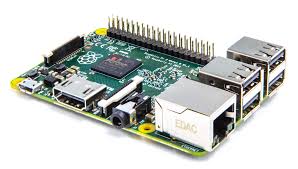
- Raspberry Pi (Amazon Link)   price ~$40
- F450 Quadcopter Kit (Ebay Link)  price ~$80
- LTE Dongle (Amazon Link)  price ~$50
- Battery Pack (Lipo) (Ebay Link) price ~$18
- Lipo Charger (Ebay Link) price ~$25
- Flight Controller CC3D (Ebay Link) price ~$13
- PC Gaming Joystick (Amazon Link) price ~$29

Some Background

A Quadcopter consists of four arms with a motor and propeller on the end of each arm. Two propellers are turning clockwise and the other two are turning counter-clockwise. There is a flight controller which keeps it leveled and converts your input commands into motion which it needs to fly. There are many cheap flight controllers available in the market. The one I used is called Open Flight CC3D. It costs only $13. Some other popular alternatives are

- Hobbyking KK2.1.5 Flight controller
- APM2.6 Ardupilot Flight Controller
- Naze32

Main parts of Quadcopter consists of a frame, a receiver, a flight controller, electronic speed controls, motors, and propellers. See below  for complete picture

Quadcopter Operation


Quadcopter motion (Throttle, Yaw, Pitch, Roll) commands are sent via RC Transmitter to RC Receiver and are  converted to PWM signals which are then used by flight controller to control the speed of Motors via Electronic Speed Conrollers (ESC). Most modern transmitters use a 2.4 Ghz frequency. RC receivers come mostly with 6 channels receivers.  Channels are the amount of things you can control. For example a four channel transmitter means you can only control four motors/servos/accessories. Mostly RC transmitter has 6 channels. These channels are controlling the Throttle, Yaw, Pitch, Roll, Aux 1, and Aux 2 (Aux can be used for different feature on your Quadcopter)

The output of the receiver is in the form  PWM signals. PWM stands for Pulse Width Modulation. PWM is a technique used to transmit data in the form of a varying pulse width. In the case of R/C electronics this time is usually 1-2 milliseconds.  For example, full throttle on your transmitter will send a 2 ms pulse to flight controller while zero throttle means puls of width 2 ms. Same rule applies to other controls on your transmitter. PWM pulse frequency is 20ms. The image below represents a typical PWM frame

PWM Signal output from RC Receiver

Replacing UHF Radio Link with IP Communication 

Main objective here is to replace the UHF radio link (2.4 Ghz) with IP communication network. Instead of using RC Transmitter we will use a regular PC gaming joystick to send control commands to Quadcopter through IP network. The commands are received by LTE dongle connected to Raspberry pi computer which converts these commands to PWM signals. The PWM signals are then used by CC3D flight controller to control the motion of flight.  See the below figure for end to end communication path

LTE Quadcopter

Note: If you are not familiar with raspberry pi, please visit https://www.raspberrypi.org/ to get some understanding .To put it short, It is is wonderful cheap little computer that can be used to make home media center, VPN, make robot and many more interesting projects. You can use almost any language on RPi though I always prefer to use Python as being very easy , high level and dynamic programming language

Raspberry Pi 2

Installing LTE modem on Raspberry Pi

I used Sakis3g script to install the drivers and application to configure the LTE modem. You can find more information at http://www.sakis3g.com/

How to communicate with LTE Dongle Private IP

One of the issue with LTE modem (dongle) is that it will be assigned private IP and will use Network Address Translation (NAT) to communicate to external world. NAT is the process where firewall assigns a public address to a network device inside private network. NAT save on the IP addresses as every network device (LTE dongle in our case) does not need a public address, and also it would hide these private devices from the outside world. For our quadcopter LTE dongle, it means that we wont be able to use the IP which is assigned to it in order to establish any IP communication to it. To overcome this problem we have to use our home Wifi router's port forwarding feature (application of NAT). Since our router's public IP is known to us ,therefore forwarding packet to our home PC coming from LTE quadcopter will not be an issue.

Let's assume that LTE dongle is assigned private IP 10.10.10.50 by the LTE network, Let's  also assume our home computer has private of 192.168.10.44 which was assigned by the Wifi router. Secondly our Wifi router has public IP of 173.75.180.60 which is known to us. We use TCP port 50050 for any communication from LTE quadcopter to Home PC. Now all we have to do is defining port forwarding table in our home wifi router. The basic rule that needs to be defined is to forward all incoming TCP packet with destination port of 50050 to our controller PC which has IP 192.168.10.44 and you are all set to have IP communication between Quadcopter and our home PC


Now here is how our end to end Communication will work

- Using Python's socket module function, Raspberry Pi (with LTE modem connected) will open a TCP connection to a port 50050 and IP 173.75.180.60.

- Python Socket Module on our home pc waits until a client connects to the port you specified

- Our home router forwards all incoming TCP packet with destination port of 50050 to our controller PC which has IP 192.168.10.44

- Once a socket is open, you can read from it like any IO object.

Below is the very basic python code that I used to do the communication between Raspberry Pi and home Computer as explained above. The code is just to give you a starting point while you can optimize the code below to have much better stabilized flight :)

Python Code on PC side


Python Code on Raspberry Pi side


Video Streaming from Quadcopter to Home Wifi Network 

Currently I am having trouble transmitting video from Quadcopter to Home Computer. I used  netcat utility to do the streaming but it makes  RPi reset every time. I believe I need to provide separate power bank. I will give update on it once successful, hopefully soon.


LTE in Unlicensed Spectrum (LTE-U)

LTE in Unlicensed spectrum (LTE-U) is one of the hot topics in 2015 telecom industry. LTE-U extends the benefits of LTE and LTE Advanced to unlicensed spectrum, enabling mobile operators to offload data traffic onto unlicensed frequencies more efficiently.

LTE-U also poses major challenges to WiFi as both will operate in an unlicensed and un-controlled spectrum. However, various techniques have been developed to share the unlicensed spectrum fairly between LTE and WiFi technologies. Please check below white paper from Nokia for more details on LTE-U

RSRP, RSSI and RSRQ

In LTE network, UEs need to measure signal strength of its own and neighbor cells constantly, during idle, connected mode or handovers in order to keep the signal quality constant. UE measures RSRP and RSRQ in LTE

Reference Symbol Received Power (RSRP):

  • RSRP is the linear average of the downlink reference signals across the channel bandwidth 
  • RSRP provides information about signal strength and  gives no indication of signal quality 
  • RSRP measurements are used in handover, cell selection and cell re-selections 
  • The reporting range of RSRP is defined from -140 dBm to -44 dBm with 1 dB resolution as shown in table below
RSRP measurement report mapping (3GPP Reference: TS 36.133)

Received Signal Strength Indicator (RSSI):

  • RSSI represents the total received wide-band power by UE
  • RSSI is measured only in symbols containing Reference signals 
  • RSSI includes power from serving cell as well as co-channel interference and noise
  • RSSI helps in determining interference and noise information 
  • RSSI is never reported by UE

Reference Signal Received Quality (RSRQ):

  • RSRQ indicates quality of received reference signal. RSRQ measurement and calculation is based on RSRP and RSSI since RSRP determines signal quality and RSSI determines co-channel interference and noise. RSRQ formula is shown below (N represents number of resource blocks)
  • The reporting range of RSRQ is defined from -19.5 dB to -3 with 0.5 dB resolution
RSRQ measurement report mapping (3GPP Reference: TS 36.133)

Example

Lets try to calculate RSRP, RSSI and RSRQ for one very simple case of one resource block with 12 sub carriers and 0.5 ms in time domain. For sake of simplicity, lets assume the power of reference symbols  (shown by red square) and power of other symbols carrying other data channels (shown by blue square) is same i.e. 0.021 watt


Since RSRP is linear average of downlink reference signal for given channel bandwidth therefore
RSRP = 10*log (0.021*1000) = 13.2 dBm

While RSSI is total received wide-band power. Therefore we have to add power of all 12 carriers in the given resource block
RSSI = 10*log(0.021*1000)+10*log(12) = 24 dBm

RSRQ is now simple ratio of RSRP to RSSI with N=1
RSRQ = 10*log(0.021/(12*0.021)) = -10.79 dB


Why do we use dBm as a unit of Power

We use decibels-milliwatts to measures power levels in telecommunication and other fields instead of Watt. The reason to use logarithmic scale is that it helps in reducing massive values to smaller number

Example : 0.00000000000080 watt which apparently looks very small value but
can still be received by antenna. The logarithmic value is just -91 dbm by using below formula
P (dBm) = 10 x Log (1000*P)

dBm vs dB

dB is ratio between two power values while dBm is used to express an absolute value of power. So when we mention RSRP and RSSI we shall always use dBm since we are talking about absolute power values but we need to use dB with RSRQ since it is the ratio of RSRP to RSSI

Overview of LTE 3GPP releases


Release 8 - LTE Introduced  

Release frozen in Dec 2008 

It was 3GPP release 8 when LTE was introduced for the very first time.  All the releases following only enhanced the technology.

Based on release 8 standardization, following were the main achievements
  • High peak data rates : Up to 300 Mbps in downlink and 75 Mbps in uplink when using 4x4 MIMO and 20 MHz bandwidth
  • High spectral efficiency 
  • Flexible bandwidths: 1.4 MHz, 3 MHz, 5 MHz, 10 MHz, 15 MHz and 20 MHz
  • Short round trip time: 5 ms latency for IP packets in ideal radio conditions
  • Simplified Architecture
  • OFDMA in downlink and SC-FDMA in uplink
  • All IP network 
  • MIMO multiple antenna scheme
  • Operation in paired (FDD) and unpaired spectrum (TDD)


Release 9 - Enhancement to LTE

Release frozen in Dec 2009

The initial enhancements were included to LTE in release 9. These were in fact the improvements which were left behind from release 8 or perhaps provided some minor improvements. These improvements are listed below with brief description

PWS (Public Warning System): Public should always receive timely and accurate alerts related to natural disasters or other critical situations. Commercial Mobile Alert System (CMAS) was introduced in release 9 in addition to ETWS introduced in release 8

Femto Cell: Femto cell is basically a small cell used in offices or homes and connected to providers’ networks through landline broadband connection. 3G Femto cells are deployed around world and in order for LTE users to take advantage of femto cell, new requirements were added to release 9

MIMO Beam forming:
 Beamforming is used to increase cell edge throughput by directing beam towards specific UE by position estimation at eNB. In release 8, LTE supported single layer beam forming based on user-specific Reference Symbols. In release 9, single layer beam forming has been extended to multilayer beam forming

Self Organizing Networks (SON): SON means self installation, optimization and healing of networks in order to reduce manual work and cost associated with technical support. The idea of SON was introduced in release 8 though the focus was more towards eNBs self configuration where as in release 9, requirements for self optimization were also added

eMBMS: With  Multimedia broadcast Multicast Services (MBMS), operators have capability to broadcast services over LTE network. The idea is not novel to the LTE and  has been used in legacy networks as well but for LTE, the MBMS channel has evolved from data rate and capacity perspective. The MBMS was already defined at physical layer in release8 but with release 9, higher layer and network layer aspects were completed

LTE Positioning: Three position methods are specified in LTE release 9 i.e. Assisted GPS (A-GPS), Observed Time difference of arrival (OTDOA) and Enhanced Cell ID (E-CID). The goal is to improve the accuracy of user locations in case of emergency scenarios where the user itself is unable to disclose his whereabouts


Release 10 - LTE  Advanced

Release Frozen in March 2011

THE LTE-Advanced specifications in release 10 includes significant features and improvements to fulfil ITU IMT-Advanced requirements which sets higher speeds than what UE can achieve from 3GPP release 8 specifications. Some key requirements laid down by IMT-Advanced are as below

- 1 Gbps DL / 500 Mbps UL throughput
- High spectral efficiency
- Worldwide roaming

Following are some significant improvements in release 10

Enhanced Uplink multiple access: Release 10 introduces clustered SC-FDMA in uplink. Release 8 SC-FDMA only allowed carriers along contiguous block of spectrum but LTE-Advanced in release 10 allows frequency-selective scheduling in uplink

MIMO enhancements: LTE-Advanced allows upto 8x8 MIMO in downlink and on the UE side it allows 4X4 in uplink direction

Relay Nodes: In order to decrease coverage loop holes, Relay nodes are one of the features proposed in release 10. The relay nodes or low power enbs extending the coverage of main eNB in low coverage environment. The relay nodes are connected to Donor eNB (DeNB) through Un interface. 

enhanced inter-cell interference coordination (eICIC): 
eICIC introduced in 3GPP release 10 to deal with interference issues in Heterogeneous Networks (HetNet). eICIC mitigates interference on traffic and control channels. eICIC uses power, frequency and also time domain to mitigate intra-frequency interference in heterogeneous networks

Carrier Aggregation (CA): CA introduced in release 10 is a cost effective way for operators to utilize their fragmented spectrum spread across different or same bands in order to improve end user throughput as required by IMT-Advanced. User throughput is increased by sending data simultaneously over two or more carriers. LTE-Advanced supports bandwidths up to 100 MHz formed by combining up to five 20MHz component carriers. Contiguous and non-contiguous carriers may be aggregated

Support for Heterogeneous Networks: The combination of large macro cells with small cells results in heterogeneous networks. Release 10 intended to layout the detail specification for heterogeneous networks

SON Improvements: Release 10 provides enhancements to SON features introduced in release 10 which also considers self healing procedures


Release 11 - Enhancement to LTE Advanced

Release Frozen in september 2012

Release 11 includes enhancements to LTE Advanced features standardized in release 10. Some of the important enhancements are listed below 

Carrier Aggregation enhancements: Following are the major enhancements to carrier aggregation in release 11
- Multiple timing advances (TAs) for uplink carrier aggregation
- Non contiguous intra band carrier aggregation
- physical layer changes for carrier aggregation support in TDD LTE

Coordinated multipoint transmission and reception (CoMP): With CoMP the transmitter can share data load even if they are not collocated. Though they are connected by high speed fiber link

ePDCCH: New enhanced PDCCH introduced in 3GPP release 11 to increase control channel capacity. ePDCCH uses PDSCH resources for transmitting control information unlike release 8 PDCCH which can only use control region of subframes

Network based Positioning: In release 11, support for uplink positioning is added by utilizing Sounding reference signals for time difference measurements taken by many eNBs. 

Minimization of drive test (MDT): Drive tests are always expensive. To decrease dependency on drive tests, new solutions introduced which are independent of SON though much related. MDT basically relies on information provided by UE

Ran overload control for Machine type communication: For machine type devices new mechanism has been specified in release 11 where network in case of mass communication from devices can bar some devices to send connection request to network

In Device Co Existence: Now a days, all mobile devices would usually carry multi radio transceivers like for LTE, 3G, Bluetooth, WLAN etc. Now this co existence results in interference. To mitigate this interference, release 11 has specified solutions as mentioned below
- DRX based time domain solutions
- Frequency domain solutions
- UE autonomous denials 

Smartphone Battery saving technique: Many applications on smartphones generate background traffic which consumes battery power. Release 11 specifies a method where UE can inform network whether it needs to be operated in battery saving mode or normal mode and based on UE request network can modify DRX parameters


Release 12 - Further enhancement to LTE Advanced

Release Frozen in June 2014

Small cells enhancements: Small cells were supported since beginning with features like ICIC and eICIC in release 10. Release 12 introduces optimization and enhancements for small cells including deployments in dense areas. Dual connectivity i.e. inter-site carrier aggregation between macro and small cells is also a focus area

Carrier aggregation enhancements: Release 12 now allows carrier aggregation between co-located TDD and FDD carriers. In addition to carrier aggregation between TDD and FDD, there is also now three carrier aggregations possible for total of 60 Mhz spectrum aggregated

Machine Type communication (MTC): Huge growth is expected in machine type communication in coming years which can result in tremendous network signaling, capacity issues. To cope with this, new UE category is defined for optimized MTC operations

Wifi integration with LTE: With integration between LTE and Wifi, operators will have more control on managing WiFi sessions. In release 12, the intent is to specify mechanism for steering traffic and network selection between LTE and WiFI 

LTE in unlicensed spectrum: An LTE operation in unlicensed spectrum is one of the study items in release 12. Operations in Bandwidth rich unlicensed spectrum brings many benefits to operators like increase in network capacity, load and performance


Release 13 - Meeting the growing throughput demand

Ongoing - Release expected to be frozen in  Dec 2015

Carrier Aggregation enhancements: The goal in release 13 is to support carrier aggregation of upto 32 CC (component carriers) where as in release 10, the carrier aggregation was introduced with support of only upto 5 CC.

enhancements for Machine-Type communication (MTC): Continuing from release 12, there are further enhancements in MTC, a new low complexity UE category is being defined to provide support for reduced bandwidth, power and support long battery life. 

LTE in unlicensed spectrum enhancements: The focus in release 13 is the aggregation of primary cell from licensed spectrum with secondary cell from unlicensed spectrum to meet the growing traffic demand

Indoor Positioning: In release 13 there is work going on improving existing methods of indoor positioning and also exploring new positioning methods to improve indoor accuracy

Enhanced multi-user transmission techniques: Release 13 also covers potential enhancements for downink multiuser transmission using superposition coding

MIMO enhancements: Upto 8 antenna MIMO systems are currently supported, the new study in this release will look into high-order MIMO systems with up to 64 antenna ports

Carrier aggregation (CA) in LTE


Background 

The demand for higher peak and higher average throughput in mobile devices has always existed. Services like YouTube, video calls and live streaming require high data speeds. In order to meet the current throughput demands and increase LTE bandwidth, a very promising feature has been introduced in LTE Advanced (3GPP rel 10 onwards)  known as carrier aggregation.

Introduction


  • CA is a cost effective way for operators to utilize their fragmented spectrum spreaded across different or same bands in order to improve end user experience
  • The basic idea of carrier aggregation is to increase user throughput by sending data simultaneously over two carriers
  • Regular cell known as primary cell (PCell) is combined/aggregated with logical cell (known as Secondary cell or SCell), serving the same cell site. Each aggregated carrier is known as component carrier, CC
    • Example: Operator A has a LTE network deployed using its 5MHz spectrum in band 3. Maximum throughput available in any cell with 2x2 MIMO is 36.2 Mbps. Operator A also has 5 MHz unused spectrum in band 5. Now the throughput can be doubled by combining both 5 MHz spectrums from two different bands using carrier aggregation 
  • The PCell is the main carrier with which UE will communicate i.e. RRC/NAS messages exchange, measurement, RACH etc. PCell always remains active in RRC Connected mode while SCell is activated/deactivated whenever required e.g. when high throughput is required
  • PCell has PDCCH in downlink and PUCCH in uplink but SCell has only PDCCH in downlink
  • 'RRC Connection Reconfiguration' procedure is used to add/remove SCell
  • As per 3GPP standardization, maximum of five component carrier can be aggregated with each component carrier having bandwidth of 1.4, 3, 5, 10, 15 or 20 MHz. The maximum possible aggregated bandwidth can be 100 MHz (20 x 5)


  • CA aggregation is available for both FDD and TDD and the feature is backward compatible which means that the users from rel8 and rel9 can connect to CA capable site by utilizing part of total bandwidth
  • The commercial deployment of carrier aggregation has already started since 2013
Three are three types of carrier aggregation

Intra-Band Contiguous CA
When two or more component carriers belong to same frequency band and they are contiguous. There must be spacing of 300 khz x N between two contiguous component carriers (N is integer). This is the simplest form of CA aggregation from operators perspective


Intra-Band Non-Contiguous CA
When two or more component carriers belong to same frequency band but they are separated by one or more frequency gaps


Inter-Band Non-Contiguous CA
When two or more component carriers belong to different frequency bands.
This type of CA is implemented by operators who own fragmented spectrum


Physical Control Format Indicator Channel (PCFICH)

Introduction

'Channels' are used to differentiate different kinds of traffic on radio path. For example, data channels carry users traffic (Youtube, Skype data etc) and control channels carry signaling traffic to manage radio resources, setting up connection etc

The Physical Control Format Indicator Channel (PCFICH) is one of the control channels that works at physical layer. It is used to dynamically indicate the number of symbols to be used for PDCCH.

Why do we need PCFICH ? 

With the help of PCFICH channel, following scenarios are possible:

- Use less symbols for PDCCH if there are a few users with high data rates. Thus leaving more resource elements to be used for user plane data (PDSCH)

- Use more symbols for PDCCH if there are many users with lower data rates e.g VoIP calls in the cell, thus allowing more users capacity.

Signalled value

PCFICH signalled value depends on channel bandwidth. For channel bandwidth of 3MHz up to 20 Mhz it can carry value of 1, 2 or 3. But for 1.4 Mhz channel bandwidth it can carry value of 2, 3 or 4. Because in case of 1.4 Mhz bandwidth, there are few subcarriers in frequency domain.Therefore, more space is required in time domain to carry PDCCH symbols

Location of PCFICH symbols on Resource Grid

PCFICH occupies 16 resource elements in frequency domain.  These resource elements are divided into groups of four quadruplets distributed within first OFDMA symbol of each 1 ms subframe. The exact position of PCFICH can be measured from Cell ID and bandwidth using formula given in 3GPP spec 36.211 as below

Where
NRBSC = Number of frequency carriers per Resource block
NDLRB = Number of resource blocks per bandwidth
NcellID  = Physical Cell id

It may look complicated but lets try to understand it with simple example

Lets suppose
Physical Cell id = 20
Bandwidth = 10Mhz  (NDLRB = 50)

Then according to 3GPP Formula

k_Bar = (12/2).(20 mod 2*50) = 6*20 = 120

Then the four PCFICH mapping values are below 

120
120 + (50/2)*(12/2) = 270
120 + 2*(50/2)*(12/2)  = 420
120 + 3*(50/2)*(12/2) = 570

Visit LTE Resource Grid generator to validate above mapping values (Enter Cell id = 20 and Bandwidth = 10Mhz)
http://paul.wad.homepage.dk/LTE/lte_resource_grid.html 

GPRS Tunneling Protocol (GTP) in LTE

Introduction

GPRS Tunneling protocol is an important IP/UDP based protocol used in GSM, UMTS and LTE core networks. It is used to encapsulate user data when passing through core network and also carries bearer specific signalling traffic between various core network entities. This protocol has several advantages which will be discussed later.


GPRS Tunneling Protocol Types


Why is GTP used in LTE?

  • It provides mobility. When UE is mobile, the IP address remains same and packets are still forwarded since tunneling is provided between PGW and eNB via SGW 
  • Multiple tunnels (bearers) can be used by same UE to obtain different network QoS
  • Main IP remains hidden so it provides security as well
  • Creation, deletion and modification of tunnels in case of GTP-C

GTP Interfaces in LTE

In LTE, version 2 is used for GTP-C and version 1 is used for GTP-U
In simple LTE network implementation, GTP-v2 is used on S5 and S11 interfaces and GTPv1 is used on S1-U, S5, X2-U interfaces (as shown below). In inter-RAT and inter PLMN connectivity, S3, S4, S8, S10, S12 and S16 interfaces also utilize GTP protocols

How GTP-U Works ?

GTP-U encapsulation of UE user plane traffic can be easily understood by taking any simple example. Lets see what happens when IP packet generated by UE reaches to eNodeB and is then forwarded to SGW.

Consider any application on UE creates an IP/TCP packet. This packet consist of actual data by application, TCP or UDP header and then IP field information which has source address of UE and destination address of application server (e.g. Facebook)

When the eNodeB receives this packet over air interface, it will put the IP packet inside GTP header which has information related to tunnel IDs. Then further, it is encapsulated inside UDP and IP header and forwarded as ethernet frame towards SGW. Here the IP header contains eNodeB IP as a source address and SGW IP as a destination address

GTP-C signalling messages

As GTP-Cv2 in LTE is used for tunnel management, some of the signalling messages are listed below which use GTP-Cv2 protocol 


Please check Table 6.1-1(3GPP TS 29.274) for more detailed list of GTP-C based messages.


System information block 2 (SIB2) in LTE

After initial cell synchronization process is completed, UE will read master information block which contains important information regarding downlink cell bandwidth, PHICH configuration and System frame number. Then UE can read System information block 1 and System information block 2 to obtain useful information related to cell access, SIB scheduling and radio resource configuration

System information block 2 carries radio resource configuration information which is common for all UEs.

SIB2 information can be divided in following sub categories
  • Random access channel (RACH) related parameters 
  • Idle mode paging configurations 
  • Uplink physical control channel (PUCCH) and shared channel (PUSCH) configurations 
  • Uplink power control and Sounding reference signal configurations 
  • Uplink carrier frequency / Bandwidth 
  • Cell barring information 

SIB2 Example

Example SIB2 info is shown below (Taken from UE logs). This SIB2 does not represent any real network

value BCCH-DL-SCH-Message ::= 
  message c1 : systemInformation : 
        criticalExtensions systemInformation-r8 : 
            sib-TypeAndInfo 
              sib2 : 
                  radioResourceConfigCommon 
                    rach-ConfigCommon 
                      preambleInfo 
                        numberOfRA-Preambles n40,
                        preamblesGroupAConfig 
                          sizeOfRA-PreamblesGroupA n32,
                          messageSizeGroupA b144,
                          messagePowerOffsetGroupB dB10
                       ,
                      powerRampingParameters 
                        powerRampingStep dB2,
                        preambleInitialReceivedTargetPower dBm-104
                       ,
                      ra-SupervisionInfo 
                        preambleTransMax n10,
                        ra-ResponseWindowSize sf5,
                        mac-ContentionResolutionTimer sf32
                       ,
                      maxHARQ-Msg3Tx 3
                     ,
                    bcch-Config 
                      modificationPeriodCoeff n8
                     ,
                    pcch-Config 
                      defaultPagingCycle rf64,
                      nB oneT
                     ,
                    prach-Config 
                      rootSequenceIndex 30,
                      prach-ConfigInfo 
                        prach-ConfigIndex 4,
                        highSpeedFlag FALSE,
                        zeroCorrelationZoneConfig 8,
                        prach-FreqOffset 3
                     ,
                    pdsch-ConfigCommon 
                      referenceSignalPower 11,
                      p-b 1
                     ,
                    pusch-ConfigCommon 
                      pusch-ConfigBasic 
                        n-SB 1,
                        hoppingMode interSubFrame,
                        pusch-HoppingOffset 6,
                        enable64QAM FALSE
                       ,
                      ul-ReferenceSignalsPUSCH 
                        groupHoppingEnabled FALSE,
                        groupAssignmentPUSCH 0,
                        sequenceHoppingEnabled FALSE,
                        cyclicShift 0
                     ,
                    pucch-ConfigCommon 
                      deltaPUCCH-Shift ds2,
                      nRB-CQI 1,
                      nCS-AN 0,
                      n1PUCCH-AN 36
                     ,
                    soundingRS-UL-ConfigCommon release : NULL,
                    uplinkPowerControlCommon 
                      p0-NominalPUSCH -100,
                      alpha al1,
                      p0-NominalPUCCH -100,
                      deltaFList-PUCCH 
                        deltaF-PUCCH-Format1 deltaF0,
                        deltaF-PUCCH-Format1b deltaF1,
                        deltaF-PUCCH-Format2 deltaF0,
                        deltaF-PUCCH-Format2a deltaF0,
                        deltaF-PUCCH-Format2b deltaF0
                       ,
                      deltaPreambleMsg3 1
                     ,
                    ul-CyclicPrefixLength len1
                   ,
                  ue-TimersAndConstants 
                    t300 ms200,
                    t301 ms200,
                    t310 ms500,
                    n310 n10,
                    t311 ms3000,
                    n311 n1
                   ,
                  freqInfo 
                    ul-CarrierFreq 20600,
                    ul-Bandwidth n50,
                    additionalSpectrumEmission 12
                   ,
                  timeAlignmentTimerCommon sf10240


Definition of important Parameters


Rach Configurations

numberOfRA-Preambles: Total number of random access preambles available for contention based random access. Since there are maximum 64 preambles sequences available, others could be reserved by eNB for Non-Contention based random access. Range of this parameter is 4 to 64
sizeOfRA-PreamblesGroupA: Total number of random access preambles sequences available within Group A. Preambles are divided into Group A and Group B. Group A preambles are intended for sending small packets and Group B preambles are intended for sending large packets. Range of this parameter is 4 to 60
messageSizeGroupA: Message size threshold for selecting preamble Group A in term of bits (56, 144, 208 or 256 bits)
messagePowerOffsetGroupB: Power offset for selecting preamble Group B (0, 5, 8, 10, 12, 15 or 18 dB)
powerRampingStep: power ramping step size with possible values of 0, 2, 4 or 6 dB
preambleInitialReceivedTargetPower: Preamble initial received target power with values from -120 dBm to -90 dBm with step size of 2 dBm 
preambleTransMax: Maximum number of preambles transmissions. Possible values are 3, 4, 5, 6, 7, 8, 10 ,20, 50, 100, 200.
ra-ResponseWindowSize: Duration of RA response window. RA response window size is in unit of subframes (2, 3, 4, 5, 6, 7, 8, or 10 subframes)
mac-ContentionResolutionTimer: Mac contention resolution timer in unit of subframes (8, 16, 24, 32, 40, 58, 56 or 64 subframes)
maxHARQ-Msg3Tx: Maximum number of HARQ retransmissions for message 3 of RACH process (contention-based Random access) with possible values from 1 to 8 in step of 1

BCCH Configurations

modificationPeriodCoeff: The value (2,4,6,8) of this parameter is multiplied with default DRX cycle (e.g. 320ms, 640ms) to generate the BCCH modification period. It is the period in which the change in SI is repeated to UEs so that the change in SI is acquired by UE.
BCCH modification period = modificationPeriodCoeff x idle mode DRX cycle
                                         

PCCH Configurations

defaultPagingCycle: The default DRX cycle in idle mode in unit of radio frames (rf64 means 640ms )
nB: This parameter value is used in finding the actual paging frames and paging occasions in RRC idle mode with the following formula
    SFN modT = (T/N) x (UE_ID mod N)

Where 
T = Drx cycle 
N = Min (T, nB)  (nB is broadcasted in SIB2) 
UE_ID = IMSI mod 1024

PRACH Configurations

rootSequenceIndex: RA preambles are generated from  Zadoff Chu sequence which consists of series of root sequences. Each root sequence can be cyclic shifted to obtain preamble sequence. Range of rootSequenceIndex is 0 to 837. 
prach-ConfigIndex: This parameter defines exactly when UE should send RACH in frequency/time grids  (Details TS36.211 Table 5.7.1-2)
highSpeedFlag: For high speed UEs , as this can impact the correlation between cycles
zeroCorrelationZoneConfig: The zero correlation zone is used to guarantee orthogonality of generated sequences. The value depends on particular condition in the cell
prach-FreqOffset: With this information cell informs UE and other neighbor cells know about which PRB is available for RACH access

PDSCH Configurations

referenceSignalPower: This defines the energy per resource element for the reference signal using a range from -60 to 50 dBm. 
p-b: It is used to calculate the power difference between PDSCH and Reference Signal. Value is from 0 to 3

PUSCH Configurations

n-SB: Number of subbands (range 1 to 4)
hoppingMode: Hopping mode can be inter-subframe, intra or inter-subframe
pusch-HoppingOffset: Offset values range from 1 to 98
enable64QAM: if 64QAM capable UE should use it (True or False)

groupHoppingEnabled: True or False
groupAssignmentPUSCH: Gives sequence shift pattern for group hopping (0 to 29)
sequenceHoppingEnabled: True or False
cyclicShift: Frequency shift for demodulation (0 to 7)

PUCCH Config

deltaPUCCH-Shift: 1,2 or 3
nRB-CQI: Number of PRBs per slot for PUCCH2 (0 to 98)
nCS-AN: Cyclic shift used for PUCCH1 (0 to 7)
n1PUCCH-AN: PUCCH to be used for HARQ (0 TO 2047)

Sounding Reference Signaling Configurations:

The uplink Sounding Reference Signal (SRS) is configured in terms of bandwidth and subframes

Uplink Power Control

p0-NominalPUSCH: It impacts the calculation of PUSCH transmit power and applicable to non-persistent scheduling only (-126 to 24 dBm)
alpha: It also impacts the calculation of PUSCH transmit power and also scales the contribution of path loss. Possible values are 0, 0.4, 0.5, 0.6, 0.7, 0.8, 0.9 and 1
p0-NominalPUCCH: This parameter impacts the calculation of PUCCH transmit power (-127 to -96 dBm)
deltaFList-PUCCH: These parameters impacts the calculation of PUCCH  transmit power

deltaPreambleMsg3: It impacts the transmit power of PUSCH when responding to random access response grant (-1 to 6dB)

ul-CyclicPrefixLength:  To differentitate between normal (len1) OR extended (len2) cyclic prefix for uplink transmission

UE Timers and Constants

T300: Time during which UE waits for RRC connection request message response (100, 200, 300, 400, 600, 1000, 1500, 2000 ms)
T301: Started after RRC Connection Reestablishment request message. On expiration UE will go to RRC idle (100, 200, 300, 400, 600, 1000, 1500, 2000 ms)
T310: Started after receiving N310 out of sync indications (0, 50, 100, 200, 500, 1000, 2000 ms)
T311: Started after initiating connection re-establishment procedure. On expiration UE goes to RRC idle mode if it is unable to locate suitable cell (1, 3, 5, 10, 15, 20, 30 seconds)
N310: Consecutive out of sync indications (1, 2, 3, 4, 6, 8, 10, 20)
N311: Consecutive in-sync indications (1, 2, 3, 4, 6, 8, 10, 20)

Frequency Information

ul-CarrierFreq: Defined in terms of EARFCN
ul-Bandwidth: Defined in terms of resource blocks
additionalSpectrumEmission: This allows spectrum emission limits to be configured according to local requirements (1 to 32)

timeAlignmentTimerCommon: it tells UE how long it should consider itself to be time aligned in uplink in unit of subframes. (500, 750, 1280, 1920, 2560, 5120, 10240 or infinity subframes)